

There is no company to report it to
People often look for an official reporting channel. There is not one, because there is no official register — see are camera locations public. The map exists because volunteers built it, and the way to report a camera is to add it yourself.
This takes about five minutes and requires no technical background.
Before you start: safety and legality
- Observe from public space. Do not enter private property, and do not climb anything.
- Do not stop in traffic. Park safely or note the location and come back on foot.
- Do not touch, obstruct or damage the equipment. Recording a publicly visible camera's location is documentation. Interfering with it is a crime, and it also has nothing to do with mapping.
What to record
| Field | OSM tag | Why it matters |
|---|---|---|
| Position | node placement | Place the node at the pole, not at the kerb. |
| It is surveillance | man_made=surveillance | The base tag. |
| It is a plate reader | surveillance:type=ALPR | This is what separates it from a generic CCTV camera. |
| Which way it faces | direction= degrees | The single most valuable field. 0 = north, 90 = east. |
| Brand | manufacturer= | e.g. Flock Safety. Leave it off rather than guess. |
| Who runs it | operator= | Police department, retailer or HOA, if signposted. |
| How it is mounted | support= | e.g. pole, traffic_signals. |
| What it watches | surveillance:zone= | e.g. traffic, parking. |
| Date you saw it | check_date= | YYYY-MM-DD. Lets everyone judge how stale an entry is. |
Please record the direction
If you add one optional tag, make it direction. It is what
separates "there is a camera near here" from "that camera was looking at you".
About 95% of documented US cameras have it — 136,653 of 143,415 — and that high
coverage is the only reason view cones are possible at all. Stand behind the
camera, face the same way the lens does, and read the compass on your phone.
How to add it
- Create a free account at openstreetmap.org.
- Find the location and click Edit. The default iD editor works in the browser.
- Place a point at the pole.
- Search the feature type for "surveillance" and pick the camera preset.
- Switch to the tag list (the text-view toggle) and add the tags from the table above.
- Save with a short comment such as "ALPR camera surveyed on site".
The DeFlock project also provides a guided submission flow if you prefer not to use the OSM editor directly. Either route ends in the same database.
What happens next
Your edit is live in OpenStreetMap immediately. Downstream maps pick it up when they refresh their extracts — for this site and the app, that happens when the bundled database is rebuilt and shipped in an update.
Because the dataset is open under the ODbL, your one camera improves every tool built on it at once: this app, DeFlock, other map sites, and the researchers and journalists who use the same extract. That is a better return than reporting it into a private inbox.
Check whether it is already mapped
Before you add a camera, open the map and zoom to street level. If a view
cone already points down that lane, someone got there first — and you can add a
fresh check_date instead.
Know before you pass one.
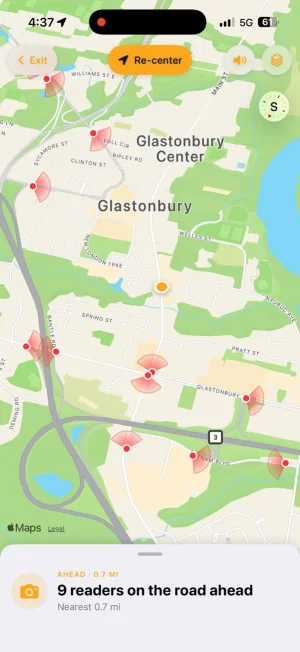
Flock Camera draws a view cone on every camera with a recorded bearing and warns you before you pass one. Free, with no account.

 Scan with your iPhone
Last reviewed 2026-08-15. Camera data © OpenStreetMap contributors (ODbL). Flock Camera is an independent project and is not affiliated with or endorsed by Flock Safety, Inc.